Featured Stage
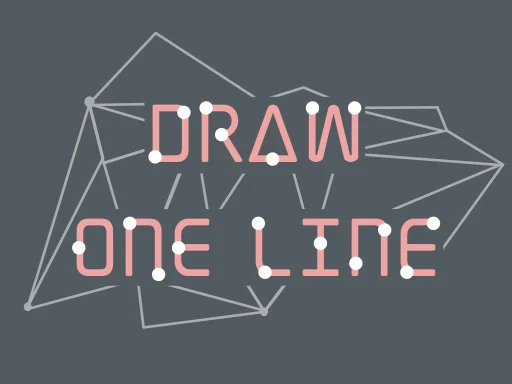
One Line Draw
One Line Draw at a Glance
One Line Draw is a minimalist browser puzzle where a single rule creates surprising depth: complete each shape in one continuous stroke. You are given a diagram made from points and connected segments, and your task is to trace the full figure without lifting your finger or mouse, without retracing edges, and without painting yourself into a corner. It feels simple in the first minute, then quietly demanding as layouts become denser and more deceptive.
The version embedded on this site keeps that formula clean. You do not need to install anything, and you can jump from level to level in short sessions. The pace is ideal for quick breaks, but the challenge rewards careful planning over speed. If you enjoy puzzle loops where each failure teaches you something useful, One Line Draw lands in a sweet spot between relaxing and genuinely brainy.
How to Play One Line Draw in Your Browser
Open the game, pick a level, and study the diagram before you touch anything. On desktop, click and hold to start your path, then drag along connected lines. On mobile, place your finger on a valid start point and trace continuously. Your route usually fails when one of three things happens: you lift too early, you pass over a segment twice, or you leave an isolated edge that cannot be reached anymore.
On this site, the game works best in a stable browser tab with enough visible drawing area. If you are on a phone, landscape orientation usually gives better control over tight segments. If your route input feels jumpy, reduce page zoom or rotate the device before forcing another attempt.
Core Controls and Input Habits That Matter
Desktop control rhythm
Mouse control is simple but precision matters. A calm, steady drag usually beats fast movement, especially in puzzles with many small intersections. Think of your cursor like a pen tip, not a racing pointer. Slower tracing reduces accidental misalignment at forks.
Touch control rhythm
On touchscreens, keep your finger pressure even and move from your wrist, not just your fingertip. Sharp direction changes are where many failed runs happen. If you often miss turns, zoom your focus on the next two junctions instead of trying to monitor the entire shape at once.
Practical Strategy for Harder Patterns
When difficulty rises, the game becomes less about hand control and more about route logic. A reliable first tactic is to identify odd-degree junctions. In one-stroke puzzle logic, these junctions often hint at where a valid path should start or end. Even if you do not formalize graph theory, this quick scan reduces guesswork.
Second, reserve narrow bridges for the right moment. A bridge-like segment that connects two dense clusters is dangerous if crossed too early, because you may block access to unfinished edges on the other side. Mentally mark these connectors before starting your stroke.
Third, learn reverse planning. If repeated attempts fail from one start point, begin from the opposite side and mirror your route decisions. Many “impossible” boards are solved this way because the order of visiting branches changes your available exits at each junction.
Fourth, use chunking. Break a large diagram into two or three local zones in your head. Solve zone A while preserving a clean exit into zone B, then close with zone C. This turns intimidating puzzles into manageable pieces and prevents panic tracing near the final third of a run.
Common Mistakes and How to Recover
Starting without a pre-scan
Jumping in instantly feels quick, but it produces more total time loss. A three-second scan before drawing often saves five failed attempts. Check for isolated tails and risky intersections first.
Crossing high-traffic nodes too early
Some intersections connect many branches. If you consume them at the wrong time, you remove your own routing options. Visit these hubs when you still have clear exits, not when only one fragile path remains.
Over-focusing on speed
The game does not reward rushed movement. Most errors happen from overconfident swipes near completion. Slow down in the last third and verify each fork before committing.
Ignoring failed-route patterns
If you fail in a similar location repeatedly, that is useful data. Stop brute forcing and ask what structural issue repeats. Usually you are entering one sub-shape from the wrong side or burning a bridge segment too soon.
Where This Puzzle Style Comes From
One Line Draw belongs to the long tradition of single-stroke puzzles, which predate digital games by centuries. The mathematical backbone is the Eulerian path idea, discussed by Leonhard Euler in 1736 when studying the Seven Bridges of Konigsberg. In plain terms, these puzzles ask whether you can traverse every edge exactly once under strict continuity rules.
Modern browser and mobile releases translate that classical concept into short, replayable level design. Game portals describing One Line variants consistently emphasize the same core loop: one continuous line, no retracing, and no lifting input. Steam listings for minimalist titles in the same family also show how this format evolved into standalone digital puzzle products, including One Line releases on PC in recent years. The visual style may differ between sites, but the design DNA is stable: tiny rules, deep routing consequences, and fast reset cycles.
Why One Line Draw Works So Well in Short Sessions
Many puzzle games need long tutorials or complex systems before they become interesting. One Line Draw does the opposite. You understand the rule almost instantly, yet mastery takes time because each board is a small logic maze. That creates a satisfying loop: attempt, learn, retry, solve, then move to a fresh pattern that tests a slightly different skill.
This structure makes the game friendly for both casual players and puzzle regulars. Casual players get quick wins and clear feedback. Experienced players enjoy route optimization, cleaner solves, and fewer resets per level. The game respects both styles without changing its identity.
Frequently Asked Questions
Is One Line Draw free to play on this site?
Yes. The browser build is playable directly in-page without downloading a client. Some portals may show ads around the game frame, but the core play loop is typically free.
Do I need to create an account before I can start?
No account is usually required for basic play. You can open the page and begin tracing levels immediately.
What are the exact basic rules?
Complete each puzzle in a single continuous stroke, do not lift input mid-path, and do not retrace completed segments. If you leave an unreachable edge, restart and re-route.
Can I play on both desktop and mobile?
Yes. Desktop works with mouse drag, while phones and tablets use touch tracing. Mobile players often get better control in landscape orientation.
Why do I keep failing near the end of a level?
Endgame failures usually come from earlier route decisions, not the last move itself. You probably consumed a key connector too soon or entered a branch from the wrong side.
Is this game based on real math concepts?
Yes. The underlying logic is closely related to Eulerian path ideas in graph theory, where the goal is to traverse every edge once under specific degree conditions.
How can I improve quickly without hints?
Use a short pre-scan, identify risky junctions, and reset early when a route becomes trapped. Also try reversing your starting point when repeated attempts fail in the same region.
Final Take
One Line Draw is a strong example of elegant puzzle design: one clear rule, fast feedback, and enough depth to stay engaging beyond the first few levels. If you want a browser game that sharpens planning without demanding a long time commitment, this is an easy recommendation.
Comments
Loading comments…